Showing posts with label Week 4. Show all posts

Friday, June 26, 2009

The threat of online security: How safe is our data?

In our information explosion era, the threat of online security had become a more and more serious problem, internet users getting information or data online. People and people conducting business online are getting more and more concern now on How Safe is our Data. We store our photo, personal information, banking account and etc in our computer, will outsiders being able to hack in and steal our data and take advantages out of it? We have to take care about that.

Internet users display more and more their personal information on web sites has created the environment of exploiting the users on a situation of disposing their data or information to others and others might misuse, damage the information. Most people do not really understand that they can protect their security online by taking reasonable steps. Computer security had played a significant role in protecting our data from misuse or damage.

The major online security threats nowadays includes accidental actions, malicious attacks, online fraud, phishing, network attacks like computer virus, worms, trojan horses and even back doors. I will explain some of it here.
For example, accidental actions which indicate problems arising from basic lack of knowledge about online security concepts and includes poor password choices, accidental disclosure and outdated software. Online fraud is internet transactions that involve falsified information such as fake IDs, certificate and recommendation letters.

In conclusion, computer security must be able to keep up with increasing sophisticated method that are using by computer hacker to keep us away from exploiting our data to others and to reduce the online security threats.

Thursday, June 25, 2009

The application of third party certification programme in Malaysia


Nowadays, in the internet world has arise many unsecured website that which provide various kind of business such as online purchasing, online payment using credit card, but, is it safety for our customer for using these infrastructure?

The answer is yes, it is safety, although fraud and identity theft have created a chilling effect on e-commerce. However the network now, the local organization has promoted some products and services to protect the security of the customer.

To gain the trust of online customer, secure Socket Layer (SSL) certificate can fulfill the customer security. In Malaysia, there is a company called MSC Trustgate.com Sdn Bhd is a third party certification programme.


MSC Trustgate.com Sdn Bhd is a licensed of Certificate Authority (CA) operating within the Multimedia Super Corridor, it was incorporated in 1999. Trustgate is licensed under the Digital Signature Act 1997, is a Malaysia law that sets a global precedent for the mandate of Certificate Authority. The core business of Trustgate’s is to provide digital certificate services, including digital certificates, cryptographic products, and software development. The vision of the Trustgate is “To enable organizations to conduct their business securely over the Internet, as much as what they have been enjoying in the physical world.” Besides that, Trustgate provide trust and encryption technology to secure customer online communication, hence protect the vital business information from interfere.


Secure Socket Layer (SSL) is a protocol developed by Netscape in 1996 which was quickly adopted around the world as the method of choice for securing data transmissions across the Internet. SSL is an integral part of virtually all web browsers and web servers and makes use of a public-and-private key encryption system originally developed by RSA.

In order to establish an SSL connection, the SSL protocol requires that a server have a digital certificate installed. A digital certificate is an electronic file that uniquely identifies individuals and servers. Digital certificates allow the client (Web browser) to authenticate the server prior to establishing the SSL session. Normally, digital certificates are signed by an independent and trusted third party to ensure their validity. The "signer" of a digital certificate is known as a Certification Authority (CA), such as VeriSign.


Customer enables the use of SSL at your Web site by obtaining and installing an SSL certificate. When a browser connects via "https" to a Web site with an SSL certificate, the browser and the server will exchange information during what is called the "SSL handshake." Once the SSL session has been negotiated, all information that passes between the browser and the server will be encrypted.

As well as the VeriSign Secured Seal is a trust mark available for display on any Web site that protects its customers' confidential information using VeriSign services. The VeriSign Secured Seal indicates to online shoppers and other site visitors that organization has chosen the very best SSL and/or payment processing solution to help protect their credit cards and other confidential information via specifically designed and tested for its communication value,.

Furthermore, the Trustgate also provide other services such as Secure Server ID, Global Server ID, Mykad ID, Personel ID, Managed PKI, MyTrust, SSL VPN, Managed Security Services, VeriSign Certified Training and Application Development.

In conclusion, Trustgate is a organization that we can trust, it not only can restore the confidence of the customer, it also enhance the business transaction through the internet and we should let more people know about the Trustgate, because it enables every visitor in the world to safely exchange sensitive information.


If you are interested to know more about, you can refer to the following link:

http://www.msctrustgate.com/

Wednesday, June 24, 2009

eBay Phishing and Its Prevention Method

In these recent years, phishing is quite popular in e-commerce world. Many people lose their personal information due to "phishing". But, what is phishing? How does phishing actually happen? And, how to prevent it?

What is Phishing?

Phishing means that an intentional acquiring of other people's personal or sensitive information by acting as a business or individual. Usually, scammers will aim their target to obtain username and password on certain website such as bank, ebay and etc.

Phishing actually can be called a synonym to actual fishing. Why? Since scammers will acts as the representative of a company and send an email to try to get the personal and private information. This situation is quite similar with fishing. The scammers throw in the baits and you are the fish if you eat the baits by giving them your username and password.

How Do Scammers Phish?

PayPal and eBay were two of the earliest targets of phishing scams.

Scammers will phish for username and password to enter into the account. By using the ID, they sell fake or non-exist goods. They use the eBay's ID which have positive feedback to scam other people.

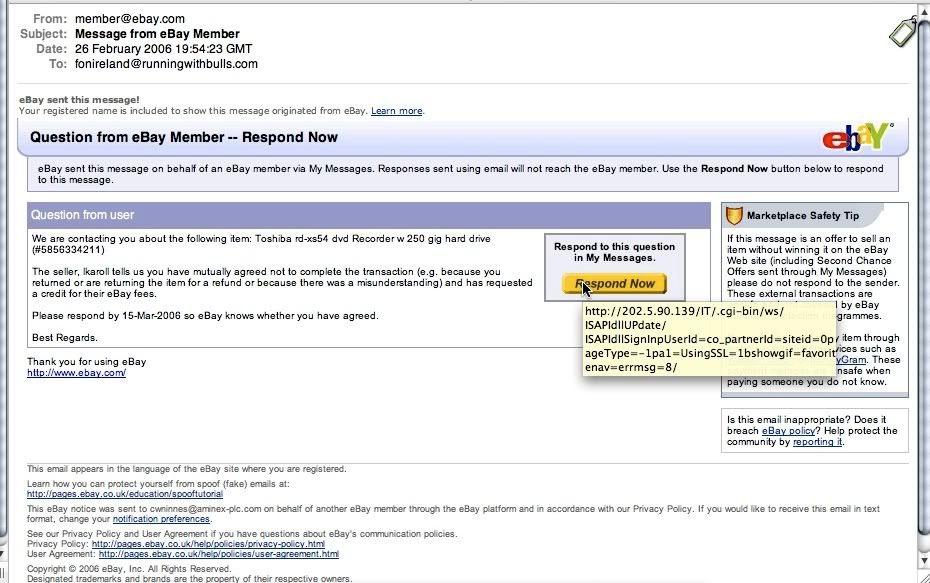
Message from member


The scammer will use message from eBay's member as masquerade. When you click respond, it will link to a faked website and when you enter your personal information into that website, they will be able to obtain it. This kind of message normally come in different style and writing.

Another method is using javascript to scam user's personal information. This method is the most clever scams. Scammers can manipulate the javascript and it is hard to recognize whether it is a scam. Normally, they use fake feedback to make buyers believe that they have high reputation in selling their goods. eBay does a lot of prevention to avoid scammers but they can still find their new way around it. So, do watch out when shopping in eBay.

Prevention

To prevent you get scammed in eBay, you must first:
  1. Check the goods the seller sold, if unrelated goods are now selling by his ID, he might be the victim of phishing.
  2. Remember, eBay or Bank will never acquire your personal information by send an email to you.
  3. Enter the email address manually, if eBay or Bank has sent you a important notice.

Besides that, for those who using the Firefox browser, there is an addon called "iTrustpage" which is an anti-phish tools that prevent users to access to a suspicious website.

At the end, I have to say that phishing is now all over e-commerce world, so be careful when buying something from the website. Don't make yourself become a fish by eating the bait that scammers throw in!

Monday, June 22, 2009

How to safeguard our personal and financial data?

The advancement of information technology (IT) makes privacy data being exposed to the public easier than before. Thus, there were so many people had become victims that their confidential data was stolen for unauthorized or illegal purpose. Hence, safeguard of personal and financial data has become an important issue for public now.

Here are the suggestions to safeguard our data:

Avoid to access own privacy data in public
Users are advice not to access own privacy data in public such as cyber café and restaurant by using provided computers. It is because these computers may unsafe for users as it may contain some software (Key-logger or Trojan) to obtain user’s data.

Users should also sign out owns account after they are finish visiting the website such as facebook and hotmail to avoid other user can access their account.

Enhance own computer’s security
Firewall, anti-virus software and password are useful to guard your computer information from the nefarious. User should always update their firewall in order to make it able to block hacker’s unauthorized access. User ought to purchase and install anti-virus software such as Kaspersky, and update it as it helps detect and delete all the Trojan, worms and malicious programs that threat users’ privacy.

It is always a good practice to keep a login password for owns computer as this helps to prevent anybody from intruding into computer when it's left unattended. Besides that, strengthen your security by choosing a password that is a composition of numbers and alphabets. (For example: 2W7Vf9dR54)

Be vigilant while using internet
Try not to visit those unfamiliar web site that those site which been warned by our anti-virus or browser (Firefox). These sites may contain down loadable malicious programs which hided in the some file which user do not know. Not to download unknown programs from the internet is encouraged since it may contain malware.

Internet users likely enter into a phishing web by clicking the hyperlink that provided in web pages. Therefore, always be vigilant on the hyperlink provided by web pages in order to avoid phishing fraud as financial information and passwords will be scamming.

Users are strongly encouraged to delete cookies, temporary internet files and caches that compromise owns privacy after internet activities. Furthermore, user should not allow browser or web-tools to remember the personal data as this action increases the risk to user.

Review monthly financial statement
Review monthly financial statements not only will alert people to possible fraudulent transactions or charges, this may also helps in finding legitimate charges for services that are either redundant or unnecessary.

Change password frequently
Users are encouraged to change password for every period of time such as one month. Changing password can helps to safeguard users’ personal and financial data.

Conclusion
As an Internet user, we should have the common knowledge on how to preventing Internet scam. The fraud and scam cases are increasing every year, our government should education Malaysian on how to prevent those scam before it’s happened. In additional, we should not too depending on the antivirus that it is not the sufficient strategy to protect our financial data especially the bank account since the hacker and cracker still able to break those anti viruses.

References:
(1) http://www.fool.com/personal-finance/general/2006/09/23/safeguard-your-financial-life.aspx
(2) http://www.isnare.com/?aid=375385&ca=Finances
(3) http://www.internationalsos.com/en/privacy.htm